Spatial Separation Calculators
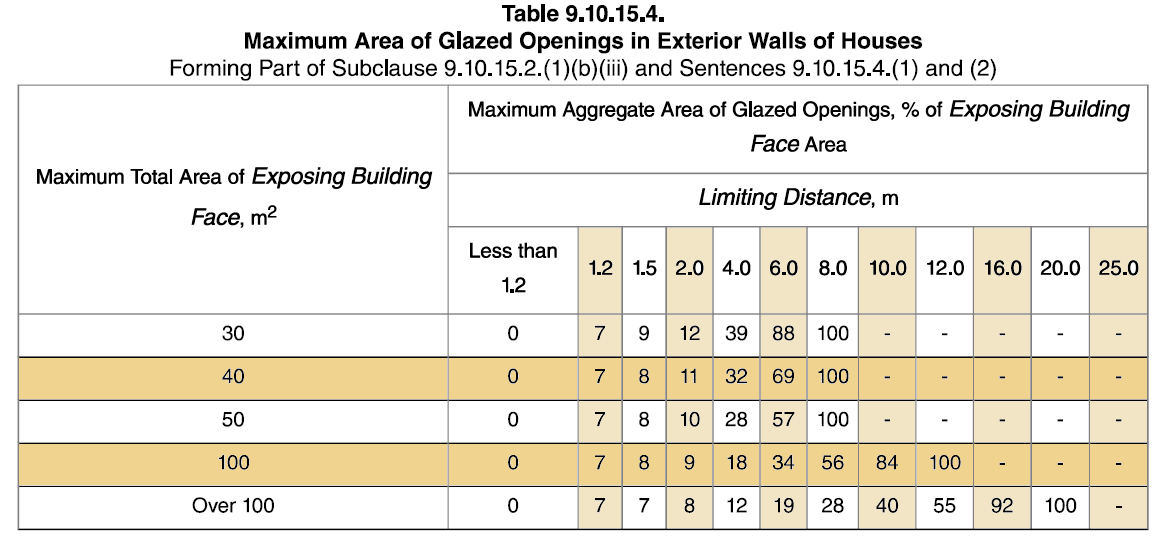
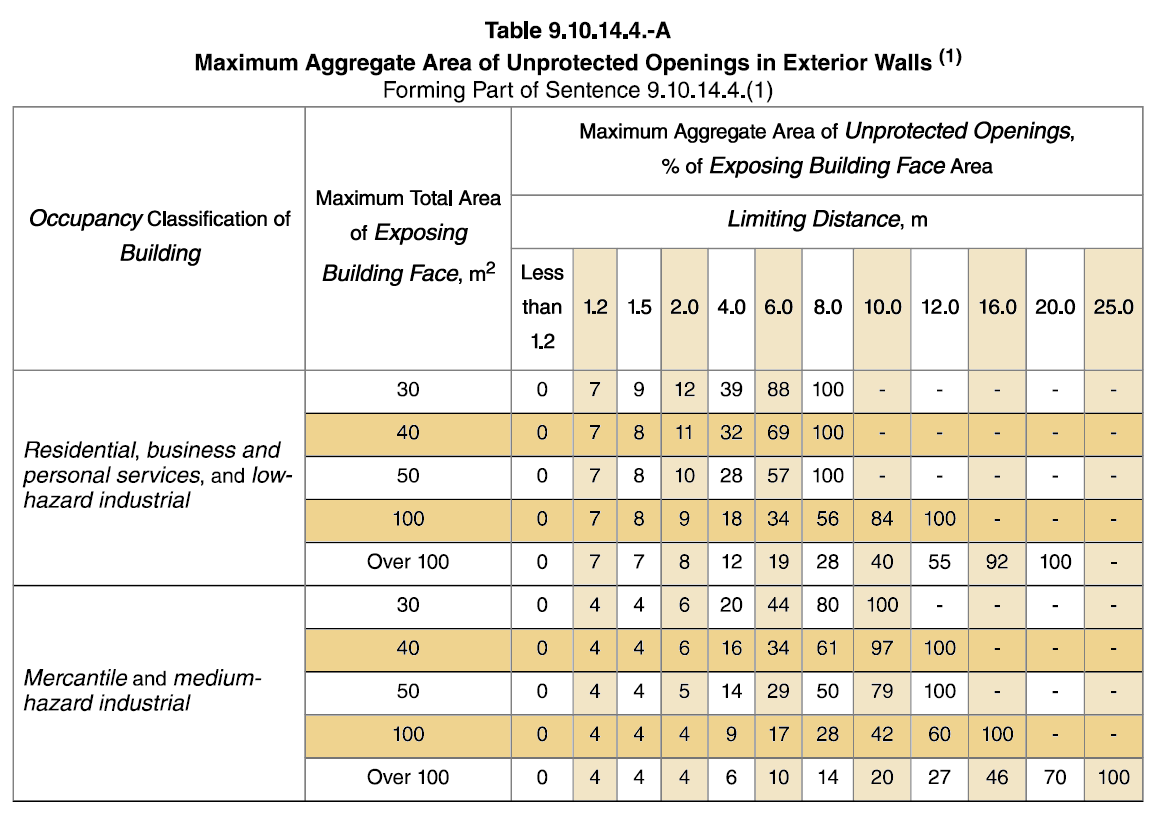
These calculators are provided as tools to help determine the allowable area of unprotected openings according to the BC Building Code Requirements in 9.10.14. and 9.10.15. Please note that the BC Building Code does not give explicit permission to use interpolations of the tables to determine permitted unprotected openings. The final decision as to whether interpolations are permitted rests with the Authority Having Jurisdiction (AHJ). It is recommended that you consult the AHJ to confirm whether or not interpolations of the tables are acceptable.
INSTRUCTIONS:
INTERPOLATION CALCULATOR FOR SPATIAL SEPARATIONS
1) Determine both the exposed building face and the limiting distance for the side of the building you are wanting to calculate the area of glazing or unprotected openings for.
2) Using the information from the appropriate table enter into Calculator 1 the Limiting Distance and the Percentage of Allowable Openings for the lines just below the distance and exposed building face required. Next enter the actual limiting distance and push the Calculate button. (See example below).
3) Using the information from the appropriate table enter into Calculator 2 the Limiting Distance and the Percentage of Allowable Openings for the lines just above the distance and exposed building face required. Next enter the actual limiting distance and push the Calculate button. (See example below).
4) Enter into Calculator 3 the Exposed Building Face amount used for Calculator 1 and the result of Calculator 1 and then the Exposed Building Face amount used for Calculator 2 and the result of Calculator 2. Next enter the actual Exposed Building Face area in m2 and push the calculator button. The answer given will be the interpolated amount of allowable unprotected openings in percent format.
5) Use the calculators below the tables to covert imperial measurements to metric as needed.
EXAMPLE
For an Exposed Building Face of 56 m2 and a limiting distance of 3.3 meters in a building of residential occupancy with no units stacked above another (secondary suites in the unit are permitted to be stacked.)
1) Use Table 9.10.15.4. (Note: Table 9.10.15.4. shows the maximum area of Glazed openings permitted
2) Enter the data from the line just under the amounts above, in this example the data used would be for an Exposed Building Face of 50. Then enter into Calculator 1 as follows: Limiting Distance 1=2, Corresponding Percentage=10, Limiting Distance 2=4, Corresponding Percentage=28, Actual Limiting Distance=3.3. Press the Calculate button and the Percentage allowed will be 21.70%
3) Enter the data from the line just over the amounts above, in this example the data used would be for an Exposed Building Face of 100. Then enter into Calculator 2 as follows: Limiting Distance 1=2, Corresponding Percentage=9, Limiting Distance 2=4, Corresponding Percentage=18, Actual Limiting Distance=3.3. Press the Calculate button and the Percentage allowed will be 14.85%
4) Finally, enter into Calculator 3 the following data: Exposed Building Face 1=50, Calculator 1 Result=21.70, Exposed Building Face 2=100, Calculator 2 Result=14.85%, Actual Exposed Building Face=56. Press the Calculate button and the Percentage allowed will be 20.88%.
SQUARE LIMITING DISTANCE CALCULATOR
As an alternate to using the tables the area of allowable unprotected openings can be determined by squaring the limiting distance. To use the calculator below simply enter the actual limiting distance into the calculator and press the Calculate Square button. For example, if your limiting distance is 1.4 meters then 1.4² = 1.96 m². The total area of unprotected openings on the exposed building face will be 1.96 m² (21.1 sq.ft.).